Professional Invoice Design: Streamlining Your Business Payments
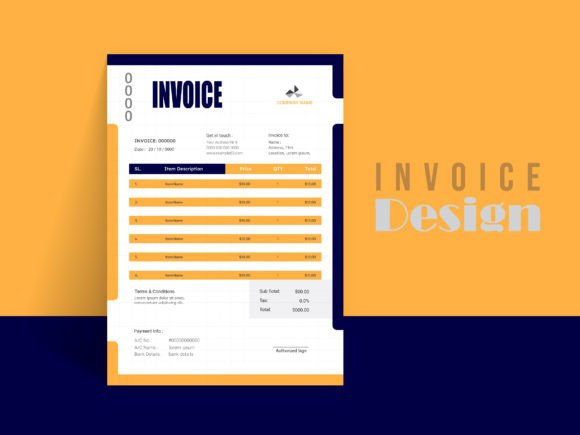
Let's be honest, the administrative side of running a creative or small business often feels like the least glamorous part of the job. You pour your passion into design, marketing, or crafting a product, but when it comes to getting paid, the process can feel clunky and unprofessional. A generic, poorly formatted invoice can undermine the premium brand image you've worked so hard to build. This is where a thoughtfully crafted Professional Business Invoice Design becomes more than just a billing document—it transforms into a final, polished touchpoint that reinforces your brand and ensures you get paid efficiently.
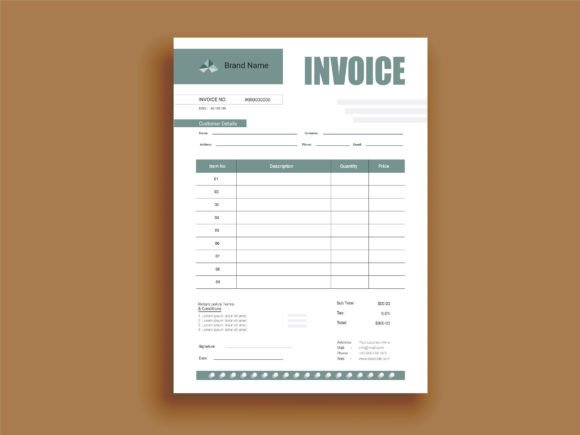
Imagine sending a client a final invoice that is as meticulously organized and visually appealing as the work you delivered for them. It’s not just about listing hours and costs; it’s about presenting a clear, branded summary of value exchanged. A well-designed invoice template does the heavy lifting for you, allowing you to list and count every piece on every project with ease. It’s a practical tool built for the reality of managing multiple clients and projects, ensuring nothing falls through the cracks when it’s time to send the invoice and receive payment.
Beyond the Basics: What Makes an Invoice Truly Professional?
A professional invoice is a cornerstone of brand identity. It communicates that you are organized, detail-oriented, and serious about your business. The visual appeal of your invoice matters more than you might think. A clean, modern layout with consistent typography and thoughtful use of space does more than look good—it enhances readability and reduces the chance of client confusion or delayed payments.
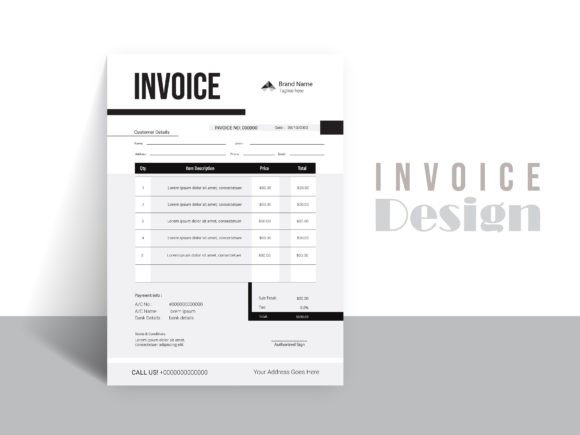
This particular design template is built with real-world utility in mind. It’s not a static image; it’s a fully editable and customizable file that works seamlessly in Adobe Illustrator, Adobe Photoshop, and Microsoft Word. This flexibility is crucial. Whether you’re a designer comfortable with vector files or a small business owner who prefers the familiarity of Word, you can tailor every element to your brand’s color palette, logo, and specific needs. The A4 size with bleed and 300 DPI resolution means your printed invoices will look crisp and professional, while the well-organized layers in the AI and EPS files make editing a straightforward process, even for those with basic design skills.
Practical Applications: More Than Just a Bill
While the primary function is billing, a versatile invoice template serves multiple roles in your business ecosystem. It’s a key piece of your marketing assets and client communication toolkit.
- Brand Consistency: Using the same branded invoice across all client touchpoints—proposals, contracts, and final bills—builds recognition and trust. It’s a subtle yet powerful form of visual consistency.
- Client Onboarding & Offboarding: A professional invoice sent promptly after project completion leaves a lasting positive impression. It’s part of the client experience that can encourage repeat business and referrals.
- Internal Tracking: The structured format helps you maintain clear records. Easily list deliverables, track hours against project scope, and maintain a organized archive for accounting and tax purposes.
- Freelance & Agency Work: For those juggling multiple projects, a reliable template saves hours. You can quickly duplicate and customize it for each client, ensuring accuracy and speed in your billing cycle.
The included file formats—AI, EPS, and JPEG—cover a range of use cases. Edit the vector source files for infinite scalability and perfect print quality, or use the JPEG for a quick digital send. Remember, the free fonts used in the design are embedded or linked, so you won’t face licensing issues for commercial use when using the template as intended.
Integrating Your Invoice into Your Brand’s Visual Language
Think of your invoice as an extension of your brand identity. The colors, typeface, and overall tone should align with your website, social media graphics, and packaging design. If your brand is minimalist and modern, your invoice should reflect that. If it’s bold and creative, let some of that personality show through—perhaps with a accent color or a distinctive header.
This is where the vector design and scalable to any dimension feature becomes invaluable. You can resize elements without losing quality, ensuring your logo and design elements look perfect whether printed on A4 paper or sent as a digital PDF. The print ready file setup means you can send it directly to a commercial printer for bulk runs without additional preparation, saving time and ensuring quality control.
For those involved in editorial design or creating digital products, the principles are the same. A cohesive visual presentation across all materials—from a magazine layout to a downloadable online course—builds a professional facade. Your invoice, in this context, is part of that larger, polished package.
Tips for Maximizing Your Invoice Template
Getting the most out of a template requires a bit of strategy. Here’s some practical advice:
- Customize Thoughtfully: Don’t just change the company name. Update the color scheme to match your brand’s primary and secondary colors. Ensure your logo is placed prominently but doesn’t overwhelm the essential information.
- Prioritize Readability: While creative font choices are fun, an invoice must be crystal clear. Use a clean sans serif font for body text and numbers. You can use a more distinctive serif font or script font for your company name or header, but ensure it remains legible at a glance.
- Test the Editable Features: Before sending to a client, open the file in your chosen software (AI, PS, or Word) and play with it. Add a sample project, adjust the due date, and make sure all fields are easy to edit. This prevents last-minute scrambling.
- Consider the Client’s Perspective: Is all the necessary information easy to find? Payment terms, bank details, and a clear summary of charges should be instantly accessible. A good design guides the eye logically.
- Leverage the Formats: Use the AI or EPS file as your master template for ongoing edits. Save a copy as a PDF for sending. Use the JPEG perhaps for a quick visual confirmation in an email body, but always attach the PDF for the official record.
Ultimately, a Professional Business Invoice Design is an investment in your business’s operational efficiency and professional image. It’s a practical design asset that solves a real problem, helping you manage projects, present your brand consistently, and facilitate smooth transactions. By taking the time to customize and implement a high-quality template, you’re not just sending a bill—you’re reinforcing your brand’s value with every interaction, down to the final payment request.