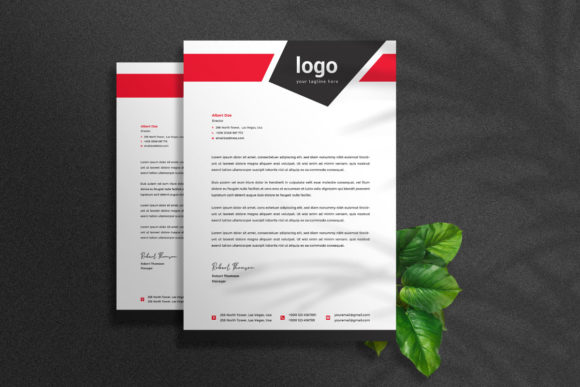
Professional Letterhead Design Templates for Modern Brands
There is a specific moment when a piece of paper transforms from a mere medium into a statement of intent. It happens when you hold a well-crafted letterhead, feeling the weight of the paper and seeing a crisp logo perfectly aligned at the top. In an era dominated by instant messaging and fleeting emails, the physical act of sending a letter, an invoice, or a contract carries significant psychological weight. It signals permanence, reliability, and attention to detail. However, achieving that level of professional polish usually requires a deep understanding of layout software and print specifications. This is where a robust letterhead design template steps in, bridging the gap between a raw idea and a finished, tangible asset that commands respect.
The Anatomy of a Print-Ready Design
Not all templates are created equal. Many downloadable files look great on screen but crumble under the scrutiny of professional printing. When we talk about a truly professional corporate letterhead design template, specifically one engineered in Adobe Illustrator, we are discussing a file structure that respects the technical demands of the industry. The foundation of this specific template set is its adherence to strict print standards: A4 sizing (8.27” x 11.69”), CMYK color mode for accurate ink reproduction, and a high-resolution 300 DPI output. These aren't just numbers; they are the difference between a logo that looks muddy and one that pops off the page.
The inclusion of a 0.125-inch bleed is a critical feature that often gets overlooked by beginners but is celebrated by designers. The bleed ensures that when the paper is cut to its final size, there are no unprofessional white edges creeping in at the border. For a business owner trying to establish a corporate identity, these technical details are usually invisible headaches. By utilizing a template that has these layers properly organized, you bypass the trial-and-error phase that usually leads to rejected prints and wasted budgets.
Why Vector Formats Matter for Brand Longevity
One of the standout advantages of this particular asset is the delivery format: Adobe Illustrator (AI and EPS). While raster images (like JPEGs or PNGs) are made of pixels and degrade when resized, vector files are mathematically calculated paths. This means whether you are printing a tiny receipt or scaling the design up for a trade show banner, the lines remain sharp and the text remains legible.
For a startup or a freelancer, this versatility is invaluable. You aren't just buying a static image; you are investing in a malleable design asset. Because the files come in both AI and EPS formats, you have the flexibility to work within Adobe Illustrator or import the vectors into other software like CorelDRAW or Affinity Designer. The "super easy to edit" promise of this template relies on this vector foundation. You can deconstruct the design, move elements around, and rebuild it to suit a new sub-brand without ever losing quality.
Aligning Typography with Corporate Identity
A letterhead is more than just a logo stamp; it is a framework for communication. The typography chosen for the body text and the header defines the voice of the brand before the reader even processes the words. This template set acknowledges the importance of modern typography by utilizing only free fonts, with links provided in the help file. This is a massive relief for small business owners who often fall in love with a design only to discover they need to purchase an expensive commercial license for a single typeface.
When customizing the text, consider the personality of your business. Are you a legal firm that requires the gravity of a serif font? Or perhaps a tech startup that needs the clean, airy feel of a sans serif typeface? The organized layers in the file allow you to swap out font styles effortlessly. Good readability is paramount here; a fancy script font might look beautiful for the company name, but it will cause eye strain if used for the contact details in the footer. The template encourages this kind of functional hierarchy, guiding the eye from the logo to the message and finally to the call to action.
Practical Applications Beyond the Standard Letter
While the primary function is correspondence, a well-designed corporate letterhead template serves as a master key for a suite of other branding materials. Once you have customized the colors and logo to match your brand identity, that design language should bleed into other areas of your business to ensure visual consistency.
Think about the user experience of your client. When they receive an invoice, does it look like it came from the same company that sent the proposal? By using this AI file as a base, you can easily strip away the "letter" elements to create:
- Invoice and Receipt Templates: Keeping your billing documents consistent with your correspondence builds trust.
- Memorandums and Internal Notes: Even internal communication benefits from a structured, professional layout.
- Fax Cover Sheets: Yes, some industries still use them, and having a matching design prevents your documents from looking like spam.
- Certificate of Authenticity: For crafters or artists selling high-end goods, a letterhead-style certificate adds immense perceived value.
Furthermore, the design elements contained within the file—such as geometric shapes, header bars, or footer accents—can be repurposed for digital assets. You might use the header design for a webinar slide deck or adapt the footer style for email marketing graphics. This adaptability is what separates a generic download from a premium design asset.
Color Psychology and Customization
The fact that this template comes with four distinct color variations is a strategic advantage. Color is often the first thing a viewer registers, and different hues evoke different emotional responses. A corporate blue suggests stability and trust, while a vibrant orange might imply creativity and energy.
Having four variations allows you to A/B test your stationery or maintain different letterheads for different departments. For example, the sales team might use a variation with a bold accent color to draw attention to a special offer, while HR might use a more subdued palette for official documentation. Because the files are in CMYK, you can be confident that the deep burgundy you choose on screen will print as a rich wine color, not a muddy brown. The organized layers make the color-swapping process a matter of seconds rather than hours, allowing you to focus on the message rather than the mechanics of the file.
The Importance of a Help Guide
One of the most frustrating experiences in design is opening a complex file and not knowing where to start. Layers might be locked, groups might be confusing, or fonts might be missing. This package mitigates that frustration by including a comprehensive help guide. For a content creator or entrepreneur who is proficient but not necessarily an expert in Adobe Illustrator, this guide is the bridge to a professional result.
It ensures that you don't accidentally delete a safety layer or mess up the alignment of the grid. It demystifies the file structure, allowing you to get to the "editable text" and "logo" areas immediately. This focus on user experience reflects a modern understanding of design tools: they should empower the user, not confuse them.
Building Trust Through Professional Presentation
In the world of B2B and B2C interactions, perception is reality. A poorly formatted Word document with a low-resolution logo pasted into the corner suggests a lack of investment and attention to detail. Conversely, a crisp, balanced, and professionally typeset letterhead suggests that the company cares about its image and, by extension, cares about the quality of service it provides to its clients.
This is particularly crucial for businesses that deal with high-value contracts, such as consultants, architects, or financial advisors. The letterhead is often the "closer"—the final document that bears the signature. It needs to exude confidence. By utilizing a template that has already solved the complex layout problems, you can focus entirely on the content of your message, secure in the knowledge that the vessel carrying that message is flawless.
Conclusion
A corporate letterhead design template is not merely a shortcut; it is a strategic tool for brand management. By leveraging the precision of Adobe Illustrator vectors, the reliability of print-ready specifications, and the flexibility of organized layers, this asset empowers businesses to present themselves with authority. Whether you are sending a simple thank-you note or a complex legal agreement, the stationery you use tells a story. With this template, that story is one of professionalism, consistency, and modern design sensibility.