Master Your Classroom: The Ultimate Editable Teacher Planner
Every educator knows that the difference between a chaotic semester and a successful one often comes down to preparation. While passion drives the teaching, organization sustains it. However, finding a planning system that truly fits your unique workflow can be a challenge. Pre-made planners from office supply stores often lack the specific pages you need or force you into a rigid structure that doesn't match your style. This is where the power of digital customization steps in to bridge the gap between generic stationery and personalized efficiency.
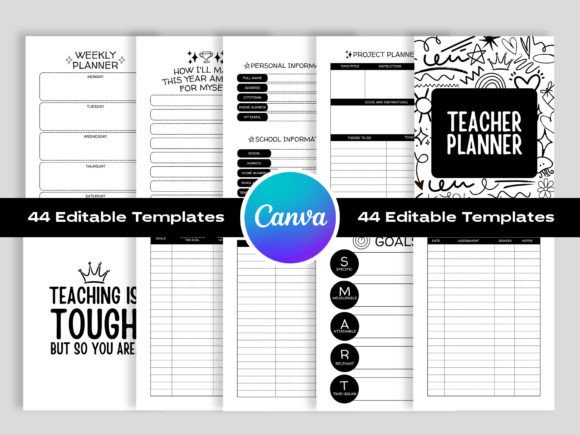
Imagine a planner that not only organizes your entire year but also aligns with your personal aesthetic and professional needs. The Canva Editable Undated Teacher Planner offers exactly that: a comprehensive, 44-page system designed for the modern educator. It combines the tactile satisfaction of a high-quality printout with the flexibility of digital editing. By leveraging Canva’s intuitive interface, you gain total control over every aspect of your schedule, from the font choices to the color palette, ensuring your planning tool feels like it was made just for you.
Why Flexibility Matters in Educational Planning
Teaching is rarely static. Curriculums shift, student needs evolve, and your own organizational habits might change from year to year. A dated planner is inherently limiting; once the year passes, its utility drops significantly. An undated system, however, is timeless. You can start using it in August, January, or whenever your contract begins without wasting a single page.
The true innovation of this particular Teacher Planner lies in its Canva integration. For those unfamiliar, Canva is a free, web-based design platform. When you purchase this template, you aren't just buying a PDF; you are unlocking a master file that you can manipulate. This means if the default font is too script-heavy for your taste, you can switch it to a clean sans-serif. If the black-and-white aesthetic feels too stark, you can inject brand colors or pastel tones. This level of customization transforms a standard planning tool into a creative design asset.
Beyond Basic Scheduling: A Deep Dive into the 44 Pages
A robust planning system needs to cover more than just what is happening next Tuesday. It needs to track the macro and micro elements of the classroom. This template includes 44 distinct pages, each serving a specific operational purpose. While the visual appeal draws you in, the functionality is what keeps you organized.
The structure begins with high-level strategic planning. You will find dedicated sections for Goals of the Year and Smart Goals. These aren't just blank boxes; they are frameworks designed to help you articulate your vision. By separating goals for yourself and goals for students, the planner encourages a balanced approach to professional development and classroom instruction.
As you move into the operational sections, the utility becomes even clearer. The inclusion of separate Timetable for Morning and Timetable for Afternoon pages acknowledges the reality that elementary and middle school schedules often have distinct rhythms. The Monthly Overview pages allow you to see the "big picture" for holidays and testing dates, while the Weekly Planner and Daily Schedule pages let you drill down into the specifics of lesson delivery.
Furthermore, the planner addresses the administrative burden that often weighs teachers down. Dedicated pages for Attendance Logs, Student Information, Parent Information, and Class Officers ensure that critical data is always at your fingertips. No more scrambling through sticky notes to find a parent's phone number or forgetting which student is responsible for collecting papers.
The Visual Appeal: Black and White Aesthetics
Design isn't just for artists; it’s for anyone who wants to communicate effectively. The initial design of this planner utilizes a black and white color scheme. While this might seem simple, it is a deliberate design choice rooted in versatility. Black and white is the ultimate neutral canvas. It ensures that the text is highly readable against the background, which is crucial for a document you will be staring at for 40 hours a week.
However, because the file is Canva Editable, the monochrome look is merely a starting point. If you are a primary school teacher, you might want to add bright, primary colors to the headers. If you are a high school teacher, perhaps a sophisticated charcoal and gold palette suits your classroom vibe better. The ability to modify text, colors, fonts, and layout style means this single template can generate infinite visual variations. It allows you to create a cohesive brand identity for your classroom, which can subtly impact how students perceive the learning environment.
Technical Excellence for a Polished Result
Nothing is more frustrating than designing a beautiful document only to have it print blurry or pixelated. This template addresses those concerns with professional-grade specifications. The files are set to 300 DPI (dots per inch), which is the industry standard for high-quality printing. This ensures that any graphics, lines, or text remain crisp and sharp on paper.
Additionally, the color mode is set to CMYK. If you have ever tried to print a bright neon color you saw on your screen and got a dull version on paper, it is because of color mode differences. RGB (screen colors) and CMYK (print colors) behave differently. By providing CMYK files, this planner guarantees that what you design on screen will look accurate when printed.
The dimensions are set to 8.5x11 inches, the standard US Letter size, making it compatible with almost any home or office printer. The "No Bleed" setting means you don't have to worry about cutting off the edges of your design when printing at home. You receive the files in multiple formats—PDF, JPG, and PNG—giving you the flexibility to print the whole book at once or send individual pages to a professional print shop.
Streamlining Workflow with Specialized Pages
Teaching involves a significant amount of "invisible work"—the tracking, grading, and organizing that happens behind the scenes. This planner includes several pages specifically designed to make that work visible and manageable.
The Grades Tracker and Homework Tracker are essential for maintaining accountability. While digital gradebooks are common, many teachers prefer a paper backup or a quick-reference sheet to jot down participation grades or homework completion during class.
For literacy-focused educators, the Class Reading Log is a standout feature. It allows you to track what books are circulating in your classroom library or monitor independent reading progress. Similarly, the Group Assignments and Project Planner pages help manage the complex logistics of collaborative student work, ensuring that deadlines and responsibilities are clearly mapped out.
Even the smaller details have been considered. A Bank of Ideas page provides a dedicated space to jot down inspiration when it strikes—perhaps a new activity idea or a classroom management strategy you want to try. The Password Log is a practical necessity for educators who manage multiple digital platforms, from LMS systems to educational game subscriptions.
How to Customize Your Planner
The process of personalizing this Editable Teacher Planner is designed to be user-friendly, even for those with no graphic design experience. It follows a simple workflow:
- Access Canva: You start by logging into or creating a free Canva account.
- Open the Link: Upon purchase, you receive a direct link to the master template.
- Customize: This is the creative part. You can change the header fonts to match your favorite script style, swap the monochrome background for a patterned paper, or adjust the layout spacing to fit your handwriting size.
- Download and Print: Once you are satisfied with the design, you download the high-quality files and print them.
This workflow empowers you to create a premium product without hiring a designer. It turns the planner into a true digital product that you own and control. Whether you prefer a minimalist layout with ample white space or a packed schedule with decorative borders, the choice is yours.
Practical Applications for Modern Educators
In an era where teachers are increasingly building personal brands—whether through Teachers Pay Teachers stores, educational blogs, or Instagram accounts—having a visually consistent aesthetic matters. Using this planner as a design asset allows you to create a cohesive look for your professional life.
Furthermore, the versatility of the template extends beyond the classroom. The Project Planner and Weekly Planner pages are equally useful for department heads managing curriculum changes, tutors organizing client schedules, or homeschooling parents structuring their children's education.
The inclusion of Important Dates and Quarterly Overviews helps in long-term strategic planning, ensuring you aren't just reacting to the week ahead but proactively preparing for the months to come. By having a physical copy of your schedule, you reduce screen time—a benefit for anyone suffering from digital fatigue.
Final Thoughts on Organization and Creativity
A planner should work for you, not the other way around. The Canva Editable Undated Teacher Planner represents a shift in how we view organizational tools. It moves away from the static, one-size-fits-all model and embraces a dynamic, user-centric approach. By combining high-quality print specifications with total design freedom, it allows educators to bring order to their busy lives while expressing their unique professional style.
Whether you are a veteran teacher looking to revamp your system or a new educator setting up your first classroom, having a reliable, beautiful, and functional planner is a game-changer. It reduces stress, saves time, and ultimately allows you to focus on what truly matters: your students. With 44 pages of comprehensive tracking, planning, and creative potential, this tool is ready to become the command center of your educational journey.