BitePal: Mastering Your Culinary Command Center
Imagine walking into your restaurant's kitchen during the dinner rush. Orders are printing, staff are moving with purpose, and you need to see the big picture in a single glance. This is where a powerful admin dashboard transforms chaos into choreography. BitePal - Restaurant Admin Dashboard is designed to be that central nervous system for your culinary business, offering a visually sophisticated and functionally robust platform that goes far beyond simple order tracking. It's about gaining clarity, making informed decisions, and ultimately, crafting a smoother experience for both your team and your customers.
A Design That Works as Hard as Your Staff
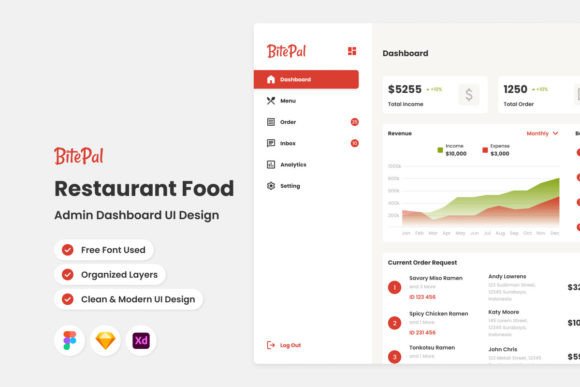
What immediately stands out about BitePal is its commitment to modern, intuitive design. This isn't a cluttered spreadsheet masquerading as a management tool. The interface is clean, with a logical flow that prioritizes the information you need most—active orders, table status, sales summaries, and inventory alerts. For a restaurant owner or manager, this visual clarity is crucial. It reduces cognitive load, allowing you to spot bottlenecks, celebrate wins, and pivot strategies without digging through menus. The dashboard's aesthetic, with its thoughtful use of color and typography, isn't just for show; it creates a professional environment that your staff will actually enjoy using, which directly impacts efficiency and morale.
From Desktop Command to Mobile Agility
The true power of a modern design asset lies in its adaptability. BitePal excels here with fully responsive layouts for both desktop and mobile. Picture this: you're reviewing weekend performance reports on your office computer, but you get an urgent alert on your phone while you're away from the site. The mobile version isn't a stripped-down afterthought; it's a fully functional command center in your pocket. You can approve comps, check on a delayed ticket, or view real-time sales data with the same ease as on the larger screen. This seamless transition between devices means you're always connected to your operation, embodying the kind of agile management the fast-paced culinary world demands.
More Than a Tool: A Foundation for Brand Consistency
While BitePal is primarily an operational tool, its design principles offer a masterclass in visual communication that can inform your broader brand identity. The dashboard's use of global text and color styles is a perfect example. Consistency is the bedrock of brand recognition. The same logic that makes a dashboard easy to scan—consistent headings, a harmonious color palette for different order statuses, clear iconography—should be applied to your menu design, your website, and your social media graphics. By studying how BitePal organizes information, you can extract valuable lessons for creating a cohesive visual language across all customer touchpoints, from the digital menu on a tablet to the printed signage in your window.
Think about your packaging design. A takeout bag or a delivery box is a direct extension of your restaurant's experience. Using the clean, modern typography and organized layout principles found in a well-designed dashboard can elevate your packaging from functional to memorable. Similarly, for social media graphics, the clear hierarchy and balanced composition seen in BitePal's interface can help you create posts that stop the scroll—whether it's announcing a new special, sharing a chef's story, or promoting an event. The dashboard becomes a case study in effective, purposeful design.
Practical Applications for the Creative Entrepreneur
Let's get specific about how the design philosophy behind an admin dashboard can spark ideas for your own projects, whether you're a designer, a small business owner, or a content creator.
- Website & Blog Design: A restaurant's website needs to be as easy to navigate as its dining room. The intuitive, card-based layout of a dashboard can inspire a website structure that guides visitors effortlessly from your story to your menu to a reservation form. For a blog, this approach can improve readability and keep readers engaged longer.
- Editorial & Print Layouts: Designing a menu, a brochure, or a poster? The principles of visual hierarchy used to highlight an urgent order on a dashboard are the same principles you use to make a headline pop or guide a reader's eye through a brochure. Clean, sans serif fonts often used in dashboards for clarity can provide a modern, professional feel for these materials.
- Digital Products & Marketing Assets: If you're creating an online course, an ebook, or a set of social media templates, a dashboard's organized structure is a goldmine. It teaches you how to present complex information (like course modules or marketing funnels) in a digestible, user-friendly format. The use of free vector icons for quick recognition is a tactic you can replicate to make your own digital products more intuitive.
Making Smart Design Choices for Your Projects
When you're building your own brand or client projects, the choices you make in typography and layout are fundamental. Here’s some practical advice inspired by the kind of thoughtful design you see in professional tools like BitePal:
- Match Style to Function: A display font with personality might be perfect for your logo or a poster headline, but it would be disastrous for the small text on a dashboard button. Always ask: "What is the primary job of this text?" For body copy and functional elements, prioritize readability above all else. A clean sans serif or a highly legible serif font is your workhorse.
- Test Font Pairings Relentlessly: Don't just choose two fonts you like; see how they interact. Use a modern typography pairing—like a geometric sans serif for headings and a classic serif for body text—to create contrast and visual interest without sacrificing clarity. Tools that simulate dashboards or websites can help you test these pairings in context.
- Consider the Commercial Context: If you're designing a logo or brand identity for a client, ensure the typeface you select has a license that covers commercial use. Many premium font foundries offer different licensing tiers. This is a non-negotiable step for professional work.
- Embrace Organized Systems: Just as a dashboard uses well-organized layers, structure your design files meticulously. Name your layers, group related elements, and use color styles consistently. This isn't just about being tidy; it saves immense time during revisions and ensures brand consistency across all assets, from a web design mockup to a final print material.
In the end, whether you're running a bustling bistro or building a brand from the ground up, the core challenge is the same: managing complexity with grace and clarity. Tools and design resources that prioritize user experience and visual intelligence, like the BitePal dashboard, do more than just solve a problem—they set a standard. They remind us that good design is functional, beautiful, and ultimately, a powerful ally in achieving our goals. By applying these principles thoughtfully to your own creative or commercial projects, you can build something that not only looks professional but works brilliantly.